-Dark.png?width=250&height=127&name=CS-Coaching%20Systems%20Logo-Alt%20Version(1)-Dark.png)
Overview
Settings is organized into tabs: Courses, Notifications, Tags, and Plan. Each controls a different part of how your organization's courses, communications, and student records behave.
Courses tab
Selecting a course from the list on the Courses tab expands its settings, letting you configure:
|
Field |
What it controls |
|
Completion deadline |
How long a student has to complete the course once it's assigned (for example, 6 Months). |
|
Refresher assigned after |
How long after completion a refresher should automatically be assigned |
|
Remediation courses |
The set of remediation courses linked to this course, available for assignment when a student needs one. |
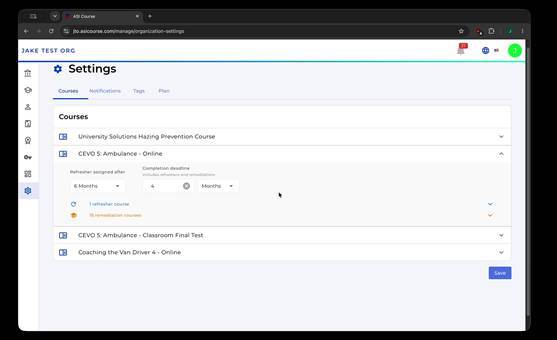
Per-course settings, including completion deadline, refresher timing, and linked remediation courses.
Tip: These settings are what drive automatic refresher assignment and determine which remediation courses are available to assign for a given course.
Notifications tab
The Notifications tab controls who gets emailed, and when, around course completion and deadlines:
|
Setting |
What it does |
|
Course Completion Notifications |
Choose which instructors get an email whenever a student completes a course. |
|
Deadline Notifications |
Set how many days before a course's deadline students are emailed a reminder (for all courses). |
|
Past Due Notifications |
Choose which team members are notified by email when a student goes past due on a course. |
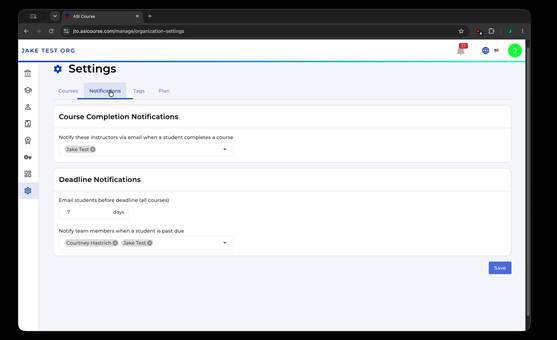
Notification settings for course completions and approaching or passed deadlines.
Tags tab
Tags let you define custom fields on student records. Each tag has:
|
Field |
What it controls |
|
Name |
The label for the custom tag. |
|
Type |
Dropdown (a fixed list of selectable values) or Text (a free-text field). |
|
Options |
For Dropdown tags, the list of selectable values, each added with Add option. |
|
Display on signup |
Whether the tag appears as a field students fill in when they sign up. |
Use Add Tag to create a new one, and Add option to add selectable values to a Dropdown tag.
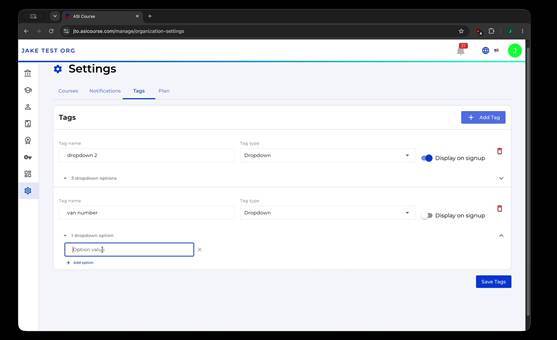
Configuring a custom dropdown tag, including its options and signup visibility.
Plan tab
The Plan tab shows your organization's current subscription details:
|
Field |
What it shows |
|
Status |
Whether the organization's plan is currently Active. |
|
Plan End Date |
The date through which the current plan is valid. |
|
Certificate Expiration |
How long, in months, certificates issued under this plan remain valid before expiring. |
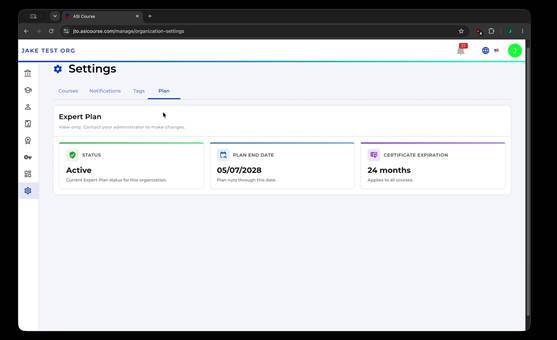
Plan status, end date, and certificate expiration period.
Quick reference
- Courses tab: set completion deadlines, refresher timing, and linked remediation courses per course.
- Notifications tab: control instructor completion emails, student deadline reminders, and past-due alerts to your team.
- Tags tab: create custom Dropdown or Text fields on student records, optionally shown at signup.
- Plan tab: view your plan status, end date, and certificate expiration window.