-Dark.png?width=250&height=127&name=CS-Coaching%20Systems%20Logo-Alt%20Version(1)-Dark.png)
Authorization Key Course Redemption Guide
Steps to Redeem a Course Authorization Key
Once you’ve received your authorization key, follow these steps to redeem and begin your course:
- Go to the Student Login Page
- Please go to asicourse.com/com
- Please go to asicourse.com/com
- Go to the Student Login Page
- Click the green "Create Account" button on the login page.

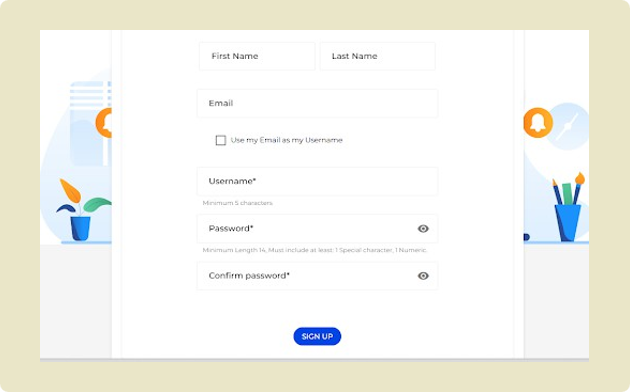
- On the registration screen, enter your personal information and click "Sign Up."
- Click the green "Create Account" button on the login page.
- Access Your Dashboard
- After signing up, you’ll be taken to your Dashboard that should be empty.
- Redeem Your Authorization Key
- In the top-right corner, click the button that says “Do you have an authorization key?”

- A pop-up window titled “Redeem Authorization Key” will appear.
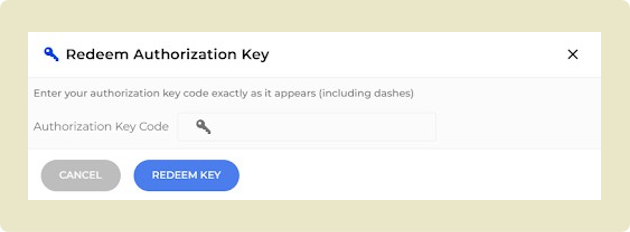
- Enter your authorization key in the space provided.
- Click “Redeem Key.”

- In the top-right corner, click the button that says “Do you have an authorization key?”
- Start Your Course
- Once redeemed, your course will immediately appear in your Dashboard.
- Click the “Start” button to begin.

- You’ll be prompted to complete any additional personal information, then continue with the course