
When someone leaves your organization, you can Disable them to help keep your records clean.
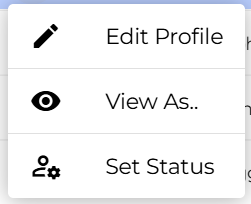
To disable or inactivate a student, click the three dots next to their name on the Students Grid and click "Set Status," then select the new status:
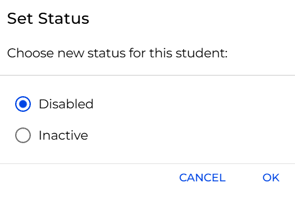
These are two different student statuses that are easy to mix up — here's the distinction:
Disabled
The student cannot log in or take courses.
Inactive
The student can still log in and take courses. However, they are excluded from automatic refresher assignment — the system won't assign them a refresher course automatically the way it would an active student.
Quick summary:
| Status | Can log in? | Can take courses? | Gets auto-assigned refreshers? |
|---|---|---|---|
| Disabled | No | No | No |
| Inactive | Yes | Yes | No |